Google Maps Midpoint Finder
Overview
Reimagining how Google Maps supports shared decision-making through midpoint-based place discovery.
My Role
UX Designer
Scope
End to end experience
Timeline
3 weeks
Setting the context
Coordinating a meetup between people is often more complicated than expected when there are multiple locations involved. People still manually compare routes and travel times before deciding where to meet. This project explores a Google Maps feature for midpoint-based venue discovery that supports group decision-making.
What does meetup coordination look like today?
Sample size - 53 survey participants, 14 interviews

88.7%
of people coordinate meetups across the city at least a few times a month.

84.9%
of people rely on navigation apps at least a few times a week.

7 in every 10 people
find it difficult to identify a convenient meeting point.
How do people choose meeting locations?
To understand the problem, interviews were conducted across in person and remote settings.
Travel Equity
People like locations where travel effort feels equally distributed. Fairness matters as much as distance.
Purpose & Timing
A midpoint works when venues match the purpose of the meeting and are open at the required time.
Group Size & Preferences
As more people are added, midpoint selection becomes increasingly shaped by individual constraints and preferences.
Known areas vs. new zones
People gravitate toward familiar areas, even when fairer options exist. Better midpoints require trust in the system.
Mapping out the user journey
Understanding how users navigate decisions, compromises, and coordination.

Stage 1: The Trigger
"Coffee this weekend?"

Stage 2: The Suggestions
Everyone suggests near themselves

Stage 3: The Route Research
One person becomes the unpaid travel agent

Stage 4: The wait
"Anywhere is fine"
(But it isn't)
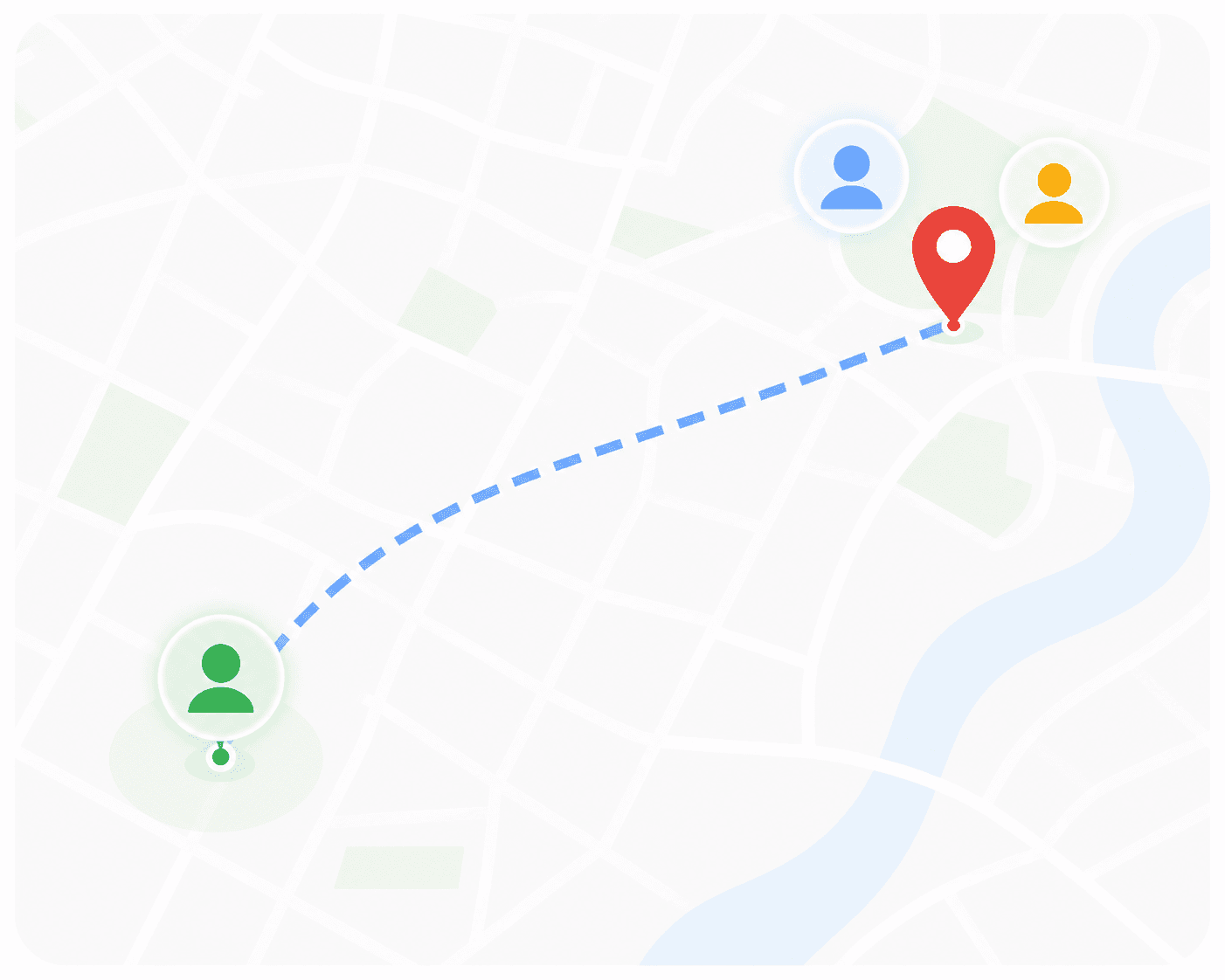
Stage 5: Someone gives in
Default to the familiar

Stage 6: The meetup
Not Fair to Everyone

How do people coordinate and decide where to meet?
Current Scenario

Pain Points
Users switch between multiple tools (Maps, Zomato, chat).
Midpoint tools fail to support venue evaluation.
Travel convenience for each participant is hard to compare.
Opportunities
Combine midpoint calculation and venue discovery in one interface.
Surface venues near the midpoint with ratings, filters and know before you go.
Visualize travel time for each participant to every venue.
Where existing solutions fall short
To better understand the current landscape, I analysed existing tools that help users find meeting points between multiple locations.

WhatsHalfway calculates a geographic midpoint, then redirects users to a Google Maps search for venues near that area (e.g. “restaurants near Road No. 3, Banjara Hills”). Since the original locations are no longer part of the search, users can’t easily compare travel distances.

While MeetWays successfully maps the route midpoint, it does not surface venue recommendations around that point.

Midpointr’s paid venue suggestions introduce a high trust barrier for a relatively low-stakes task, leading users to default to known restaurants and familiar platforms.
Why not use Google's Ask Maps?
Ask Maps is great for discovery, but not for coordinating where to meet. A dedicated Midpoint Finder balances travel and recommends places that work for everyone.
AI Ambiguity is dangerous in navigation
Navigation demands certainty: a wrong address match can send users miles away.

Conversation is ephemeral, features are persistent
Features remember frequent locations; chat requires re-establishing context every time.

Co-ordination is multi-party,
chat is single user
A shared interface supports collaborative decisions, not one-person conversations.

Discoverability through seeing, not knowing
A dedicated UI makes the feature obvious, so users discover it without knowing to ask.
For tasks where the inputs are known and the outcome must be precise, structured interfaces outperform conversational ones.
Conversational AI is great for discovering places — but coordinating where multiple people should meet requires a structured, shareable interface that makes travel fairness visible.
How might we make coordinating a convenient meeting place faster and easier?
Decisions that shaped the product
Ask Maps is great for discovery. A dedicated Midpoint Finder is optimized for coordinating between known locations.
A fair zone instead of a point on a map
Instead of recommending a single midpoint, a fair travel zone is calculated where travel distances are balanced across everyone in the group.
Contextual recommendations
Instead of ranking by ratings alone, recommendations weigh travel distance, venue ratings, and user preferences to surface the best options for the group.
Voting stays light, the conversation stays in chat
Instead of sharing multiple place links and creating a WhatsApp poll, the feature lets groups compare options and vote directly within Google Maps, while conversations stay in WhatsApp.
Distance at a glance, full comparison one tap away
Venue cards surface a quick fairness estimate (e.g., "5–7 km each") to support fast decisions. Exact travel distances for each person are available one tap away in the Compare view when you click on directions.
Introducing Meet Halfways
The right recommendations for every meetup.

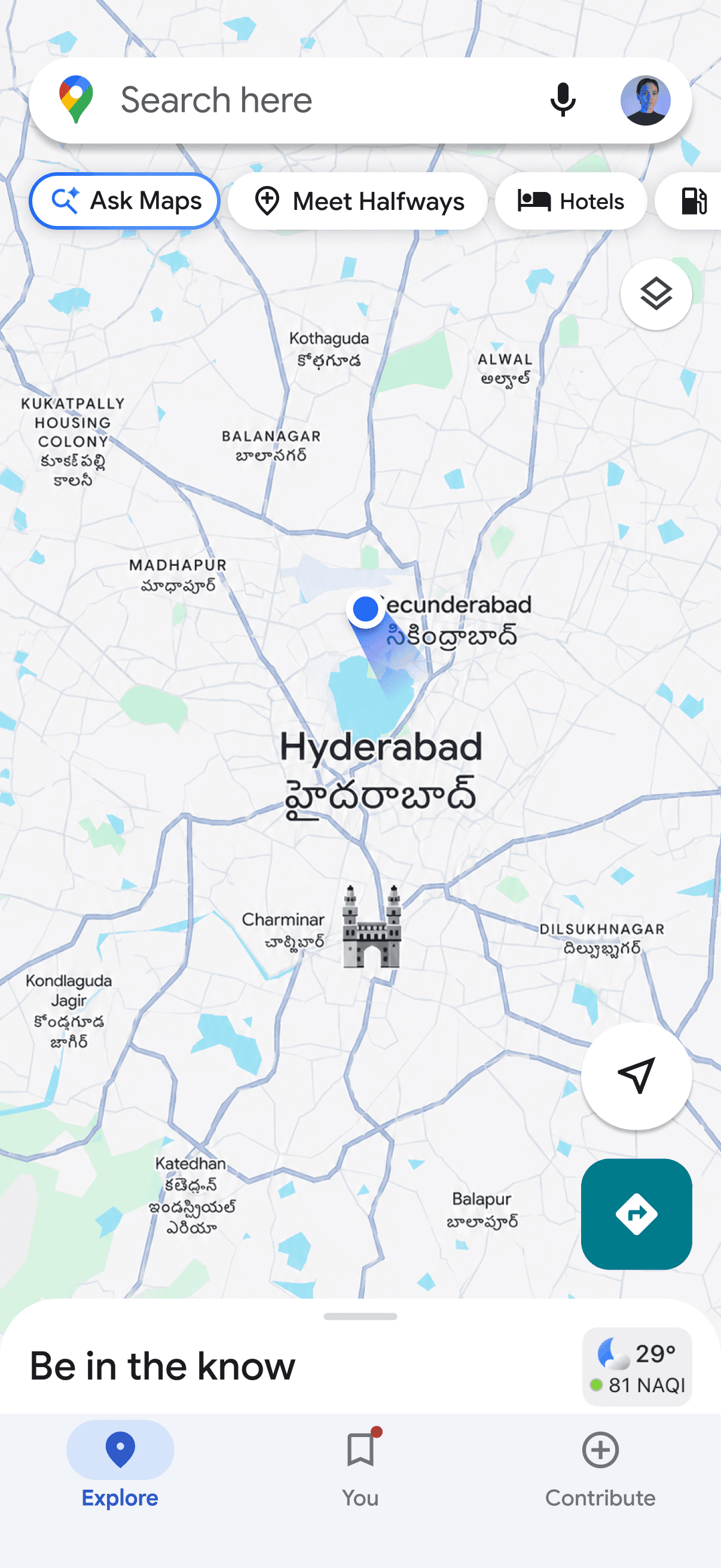


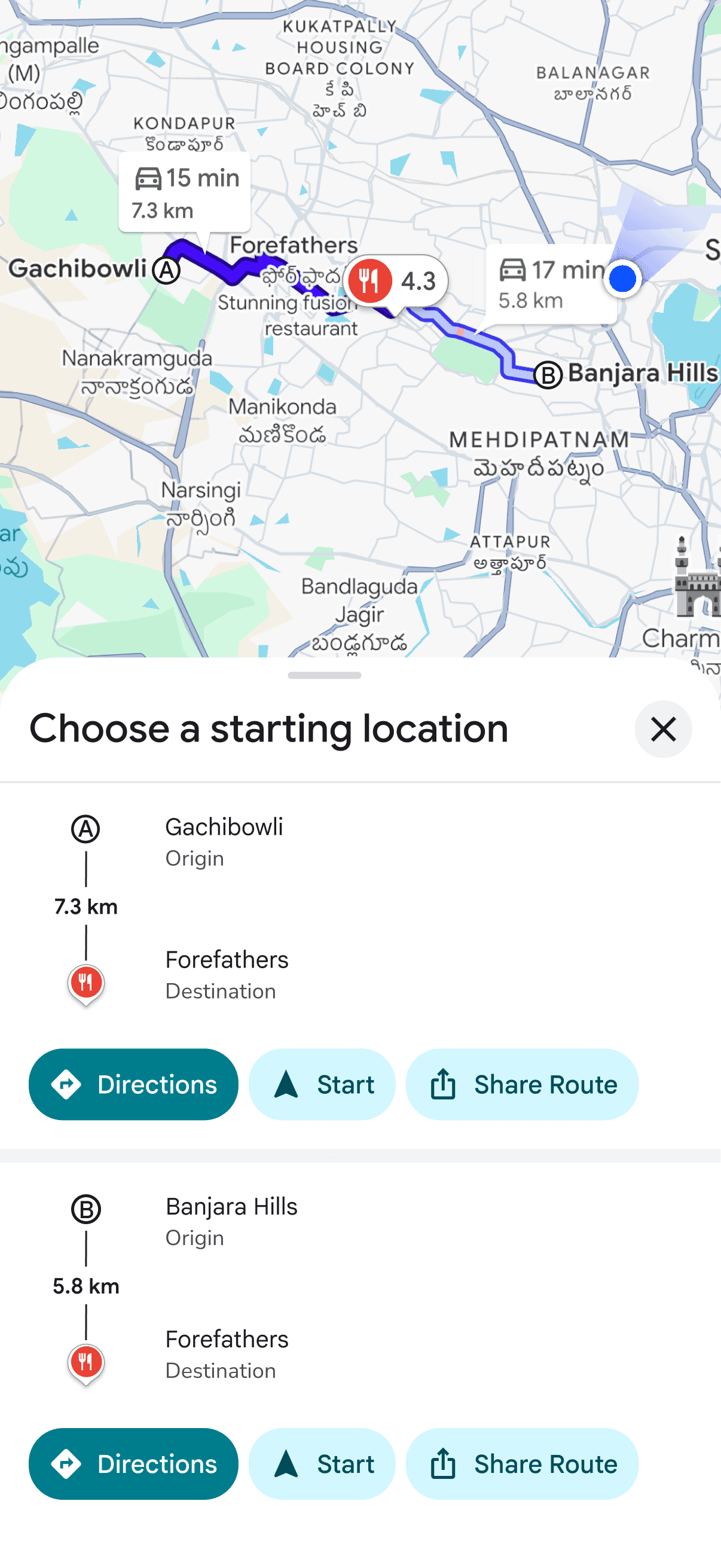


Where to find the feature?
Chip beneath the Search Bar
Start planning from the Maps home screen with a Meet Halfways chip placed beneath the search bar alongside existing quick actions.
Location Sharing
When viewing a friend's live location, a Meet Halfways action appears at the moment users are most likely to coordinate a meetup.
Links from chat
Shared lists become the collaboration surface. Recipients can instantly view the travel distances, compare venues, vote on options, and contribute additional places when editing is enabled.
Plan your meetup
Add everyone's locations and tell us what you're in the mood for.

Curated recommendations for your meetup
Balanced for convenience, relevance, and travel

Compare distances
Compare commute times at a glance and make better meetup decisions

Found great places? Share and decide together
Save places to a shared list where everyone can vote, react, and add their own suggestions

Final Screens

Google Maps Midpoint Finder
Overview
Reimagining how Google Maps supports shared decision-making through midpoint-based place discovery.
My Role
UX Designer
Scope
End to end experience
Timeline
3 weeks
Setting the context
Coordinating a meetup between people is often more complicated than expected when there are multiple locations involved. People still manually compare routes and travel times before deciding where to meet. This project explores a Google Maps feature for midpoint-based venue discovery that supports group decision-making.
What does meetup coordination look like today?
Sample size - 53 survey participants, 14 interviews
88.7%
of people coordinate meetups across the city at least a few times a month.
84.9%
of people rely on navigation apps at least a few times a week.
7 in every 10 people
find it difficult to identify a convenient meeting point.
How do people choose meeting locations?
To understand the problem, interviews were conducted across in person and remote settings.
Travel Equity
People like locations where travel effort feels equally distributed. Fairness matters as much as distance.
Purpose & Timing
A midpoint works when venues match the purpose of the meeting and are open at the required time.
Group Size & Preferences
As more people are added, midpoint selection becomes increasingly shaped by individual constraints and preferences.
Known areas vs. new zones
People gravitate toward familiar areas, even when fairer options exist. Better midpoints require trust in the system.
Mapping out the user journey
Understanding how users navigate decisions, compromises, and coordination.
Stage 1: The Trigger
"Coffee this weekend?"
Stage 2: The Suggestions
Everyone suggests near themselves
Stage 3: The Route Research
One person becomes the unpaid travel agent
Stage 4: The wait
"Anywhere is fine"
(But it isn't)
Stage 5: Someone gives in
Default to the familiar
Stage 6: The meetup
Not Fair to Everyone
How do people coordinate and decide where to meet?
Current Scenario
Pain Points
Users switch between multiple tools (Maps, Zomato, chat).
Midpoint tools fail to support venue evaluation.
Travel convenience for each participant is hard to compare.
Midpoint tools fail to support venue evaluation.
Travel convenience for each participant is hard to compare.
Opportunities
Combine midpoint calculation and venue discovery in one interface.
Surface venues near the midpoint with ratings, filters and know before you go.
Visualize travel time for each participant to every venue.
Surface venues near the midpoint with ratings, filters and know before you go.
Visualize travel time for each participant to every venue.
Where existing solutions fall short
To better understand the current landscape, I analysed existing tools that help users find meeting points between multiple locations.
WhatsHalfway calculates a geographic midpoint, then redirects users to a Google Maps search for venues near that area (e.g. “restaurants near Road No. 3, Banjara Hills”). Since the original locations are no longer part of the search, users can’t easily compare travel distances.
While MeetWays successfully maps the route midpoint, it does not surface venue recommendations around that point.
Midpointr’s paid venue suggestions introduce a high trust barrier for a relatively low-stakes task, leading users to default to known restaurants and familiar platforms.
Why not use Google's Ask Maps?
Ask Maps is great for discovery, but not for coordinating where to meet. A dedicated Midpoint Finder balances travel and recommends places that work for everyone.
AI Ambiguity is dangerous in navigation
Navigation demands certainty: a wrong address match can send users miles away.
Conversation is ephemeral, features are persistent
Features remember frequent locations; chat requires re-establishing context every time.
Co-ordination is multi-party,
chat is single user
A shared interface supports collaborative decisions, not one-person conversations.
Discoverability through seeing, not knowing
A dedicated UI makes the feature obvious, so users discover it without knowing to ask.
For tasks where the inputs are known and the outcome must be precise, structured interfaces outperform conversational ones.
Conversational AI is great for discovering places — but coordinating where multiple people should meet requires a structured, shareable interface that makes travel fairness visible.
How might we make coordinating a convenient meeting place faster and easier?
Decisions that shaped the product
Ask Maps is great for discovery. A dedicated Midpoint Finder is optimized for coordinating between known locations.
A fair zone instead of a point on a map
Instead of recommending a single midpoint, a fair travel zone is calculated where travel distances are balanced across everyone in the group.
Contextual recommendations
Instead of ranking by ratings alone, recommendations weigh travel distance, venue ratings, and user preferences to surface the best options for the group.
Voting stays light, the conversation stays in chat
Instead of sharing multiple place links and creating a WhatsApp poll, the feature lets groups compare options and vote directly within Google Maps, while conversations stay in WhatsApp.
Distance at a glance, full comparison one tap away
Venue cards surface a quick fairness estimate (e.g., "5–7 km each") to support fast decisions. Exact travel distances for each person are available one tap away in the Compare view when you click on directions.
Introducing Meet Halfways
The right recommendations for every meetup.
Where to find the feature?
Chip beneath the Search Bar
Start planning from the Maps home screen with a Meet Halfways chip placed beneath the search bar alongside existing quick actions.
Location Sharing
When viewing a friend's live location, a Meet Halfways action appears at the moment users are most likely to coordinate a meetup.
Links from chat
Shared lists become the collaboration surface. Recipients can instantly view the travel distances, compare venues, vote on options, and contribute additional places when editing is enabled.
Plan your meetup
Add everyone's locations and tell us what you're in the mood for.
Curated recommendations for your meetup
Balanced for convenience, relevance, and travel
Compare distances
Compare commute times at a glance and make better meetup decisions
Found great places? Share and decide together
Save places to a shared list where everyone can vote, react, and add their own suggestions
Final Screens
Google Maps Midpoint Finder
Overview
Reimagining how Google Maps supports shared decision-making through midpoint-based place discovery.
My Role
UX Designer
Scope
End to end experience
Timeline
3 weeks
Setting the context
Coordinating a meetup between people is often more complicated than expected when there are multiple locations involved. People still manually compare routes and travel times before deciding where to meet. This project explores a Google Maps feature for midpoint-based venue discovery that supports group decision-making.
What does meetup coordination look like today?
Sample size - 53 survey participants, 14 interviews
88.7%
of people coordinate meetups across the city at least a few times a month.
84.9%
of people rely on navigation apps at least a few times a week.
7 in every 10 people
find it difficult to identify a convenient meeting point.
How do people choose meeting locations?
To understand the problem, interviews were conducted across in person and remote settings.
Travel Equity
People like locations where travel effort feels equally distributed. Fairness matters as much as distance.
Purpose & Timing
A midpoint works when venues match the purpose of the meeting and are open at the required time.
Group Size & Preferences
As more people are added, midpoint selection becomes increasingly shaped by individual constraints and preferences.
Known areas vs. new zones
People gravitate toward familiar areas, even when fairer options exist. Better midpoints require trust in the system.
Mapping out the user journey
Understanding how users navigate decisions, compromises, and coordination.
Stage 1: The Trigger
"Coffee this weekend?"
Stage 2: The Suggestions
Everyone suggests near themselves
Stage 3: The Route Research
One person becomes the unpaid travel agent
Stage 4: The wait
"Anywhere is fine"
(But it isn't)
Stage 5: Someone gives in
Default to the familiar
Stage 6: The meetup
Not Fair to Everyone
How do people coordinate and decide where to meet?
Current Scenario
Pain Points
Users switch between multiple tools (Maps, Zomato, chat).
Midpoint tools fail to support venue evaluation.
Travel convenience for each participant is hard to compare.
Opportunities
Combine midpoint calculation and venue discovery in one interface.
Surface venues near the midpoint with ratings, filters and know before you go.
Visualize travel time for each participant to every venue.
Where existing solutions fall short
To better understand the current landscape, I analysed existing tools that help users find meeting points between multiple locations.
WhatsHalfway calculates a geographic midpoint, then redirects users to a Google Maps search for venues near that area (e.g. “restaurants near Road No. 3, Banjara Hills”). Since the original locations are no longer part of the search, users can’t easily compare travel distances.
While MeetWays successfully maps the route midpoint, it does not surface venue recommendations around that point.
Midpointr’s paid venue suggestions introduce a high trust barrier for a relatively low-stakes task, leading users to default to known restaurants and familiar platforms.
Why not use Google's Ask Maps?
Ask Maps is great for discovery, but not for coordinating where to meet. A dedicated Midpoint Finder balances travel and recommends places that work for everyone.
AI Ambiguity is dangerous in navigation
Navigation demands certainty: a wrong address match can send users miles away.
Conversation is ephemeral, features are persistent
Features remember frequent locations; chat requires re-establishing context every time.
Co-ordination is multi-party,
chat is single user
A shared interface supports collaborative decisions, not one-person conversations.
Discoverability through seeing, not knowing
A dedicated UI makes the feature obvious, so users discover it without knowing to ask.
For tasks where the inputs are known and the outcome must be precise, structured interfaces outperform conversational ones.
Conversational AI is great for discovering places — but coordinating where multiple people should meet requires a structured, shareable interface that makes travel fairness visible.
How might we make coordinating a convenient meeting place faster and easier?
Decisions that shaped the product
Ask Maps is great for discovery. A dedicated Midpoint Finder is optimized for coordinating between known locations.
A fair zone instead of a point on a map
Instead of recommending a single midpoint, a fair travel zone is calculated where travel distances are balanced across everyone in the group.
Contextual recommendations
Instead of ranking by ratings alone, recommendations weigh travel distance, venue ratings, and user preferences to surface the best options for the group.
Voting stays light, the conversation stays in chat
Instead of sharing multiple place links and creating a WhatsApp poll, the feature lets groups compare options and vote directly within Google Maps, while conversations stay in WhatsApp.
Distance at a glance, full comparison one tap away
Venue cards surface a quick fairness estimate (e.g., "5–7 km each") to support fast decisions. Exact travel distances for each person are available one tap away in the Compare view when you click on directions.
Introducing Meet Halfways
The right recommendations for every meetup.
Where to find the feature?
Chip beneath the Search Bar
Start planning from the Maps home screen with a Meet Halfways chip placed beneath the search bar alongside existing quick actions.
Location Sharing
When viewing a friend's live location, a Meet Halfways action appears at the moment users are most likely to coordinate a meetup.
Links from chat
Shared lists become the collaboration surface. Recipients can instantly view the travel distances, compare venues, vote on options, and contribute additional places when editing is enabled.
Plan your meetup
Add everyone's locations and tell us what you're in the mood for.
Curated recommendations for your meetup
Balanced for convenience, relevance, and travel
Compare distances
Compare commute times at a glance and make better meetup decisions
Found great places? Share and decide together
Save places to a shared list where everyone can vote, react, and add their own suggestions
Final Screens
Google Maps Midpoint Finder
Overview
Reimagining how Google Maps supports shared decision-making through midpoint-based place discovery.
My Role
UX Designer
Scope
End to end experience
Timeline
3 weeks
Setting the context
Coordinating a meetup between people is often more complicated than expected when there are multiple locations involved. People still manually compare routes and travel times before deciding where to meet. This project explores a Google Maps feature for midpoint-based venue discovery that supports group decision-making.
What does meetup coordination look like today?
Sample size - 53 survey participants, 14 interviews
88.7%
of people coordinate meetups across the city at least a few times a month.
84.9%
of people rely on navigation apps at least a few times a week.
7 in every 10 people
find it difficult to identify a convenient meeting point.
How do people choose meeting locations?
To understand the problem, interviews were conducted across in person and remote settings.
Travel Equity
People like locations where travel effort feels equally distributed. Fairness matters as much as distance.
Purpose & Timing
A midpoint works when venues match the purpose of the meeting and are open at the required time.
Group Size & Preferences
As more people are added, midpoint selection becomes increasingly shaped by individual constraints and preferences.
Known areas vs. new zones
People gravitate toward familiar areas, even when fairer options exist. Better midpoints require trust in the system.
Mapping out the user journey
Understanding how users navigate decisions, compromises, and coordination.
Stage 1: The Trigger
"Coffee this weekend?"
Stage 2: The Suggestions
Everyone suggests near themselves
Stage 3: The Route Research
One person becomes the unpaid travel agent
Stage 4: The wait
"Anywhere is fine"
(But it isn't)
Stage 5: Someone gives in
Default to the familiar
Stage 6: The meetup
Not Fair to Everyone
How do people coordinate and decide where to meet?
Current Scenario
Pain Points
Users switch between multiple tools (Maps, Zomato, chat).
Midpoint tools fail to support venue evaluation.
Travel convenience for each participant is hard to compare.
Midpoint tools fail to support venue evaluation.
Travel convenience for each participant is hard to compare.
Opportunities
Combine midpoint calculation and venue discovery in one interface.
Surface venues near the midpoint with ratings, filters and know before you go.
Visualize travel time for each participant to every venue.
Surface venues near the midpoint with ratings, filters and know before you go.
Visualize travel time for each participant to every venue.
Where existing solutions fall short
To better understand the current landscape, I analysed existing tools that help users find meeting points between multiple locations.
WhatsHalfway calculates a geographic midpoint, then redirects users to a Google Maps search for venues near that area (e.g. “restaurants near Road No. 3, Banjara Hills”). Since the original locations are no longer part of the search, users can’t easily compare travel distances.
While MeetWays successfully maps the route midpoint, it does not surface venue recommendations around that point.
Midpointr’s paid venue suggestions introduce a high trust barrier for a relatively low-stakes task, leading users to default to known restaurants and familiar platforms.
Why not use Google's Ask Maps?
Ask Maps is great for discovery, but not for coordinating where to meet. A dedicated Midpoint Finder balances travel and recommends places that work for everyone.
AI Ambiguity is dangerous in navigation
Navigation demands certainty: a wrong address match can send users miles away.
Conversation is ephemeral, features are persistent
Features remember frequent locations; chat requires re-establishing context every time.
Co-ordination is multi-party,
chat is single user
A shared interface supports collaborative decisions, not one-person conversations.
Discoverability through seeing, not knowing
A dedicated UI makes the feature obvious, so users discover it without knowing to ask.
For tasks where the inputs are known and the outcome must be precise, structured interfaces outperform conversational ones.
Conversational AI is great for discovering places — but coordinating where multiple people should meet requires a structured, shareable interface that makes travel fairness visible.
How might we make coordinating a convenient meeting place faster and easier?
Decisions that shaped the product
Ask Maps is great for discovery. A dedicated Midpoint Finder is optimized for coordinating between known locations.
A fair zone instead of a point on a map
Instead of recommending a single midpoint, a fair travel zone is calculated where travel distances are balanced across everyone in the group.
Contextual recommendations
Instead of ranking by ratings alone, recommendations weigh travel distance, venue ratings, and user preferences to surface the best options for the group.
Voting stays light, the conversation stays in chat
Instead of sharing multiple place links and creating a WhatsApp poll, the feature lets groups compare options and vote directly within Google Maps, while conversations stay in WhatsApp.
Distance at a glance, full comparison one tap away
Venue cards surface a quick fairness estimate (e.g., "5–7 km each") to support fast decisions. Exact travel distances for each person are available one tap away in the Compare view when you click on directions.
Introducing Meet Halfways
The right recommendations for every meetup.
Where to find the feature?
Chip beneath the Search Bar
Start planning from the Maps home screen with a Meet Halfways chip placed beneath the search bar alongside existing quick actions.
Location Sharing
When viewing a friend's live location, a Meet Halfways action appears at the moment users are most likely to coordinate a meetup.
Links from chat
Shared lists become the collaboration surface. Recipients can instantly view the travel distances, compare venues, vote on options, and contribute additional places when editing is enabled.
Plan your meetup
Add everyone's locations and tell us what you're in the mood for.
Curated recommendations for your meetup
Balanced for convenience, relevance, and travel
Compare distances
Compare commute times at a glance and make better meetup decisions
Found great places? Share and decide together
Save places to a shared list where everyone can vote, react, and add their own suggestions
Final Screens